Launch review · October meeting updates
QualityTrace · by Future Operations
Book a working session
Capability spec · For quality managers in discrete manufacturing

Install the capability to trace defects to their source.

QualityTrace brings a practical quality method into your plant: expert sessions to get it right, a practical toolkit, and the software to run it every day. Bought once. Run on your own systems.

Book a working session Estimate what it's worth ↓
  1. 01See what keeps coming back
  2. 02Stop it being made
  3. 03Catch it sooner
01 · The cost

Every station a defect passes adds to what it costs.

Caught where it's made, a defect costs a rework. Caught at final inspection, it carries the cost of every operation since. Caught by your customer, it costs a sort, an 8D and some of their confidence in your plant. The further a defect travels, the more you pay for it.

Example defect · cost ladder · relative costIllustrative
S1 Blanking
S2 Weld▲ Made here
▲ Where it was made: rework
S3 Press
S4 Laser trim
Two stations on: labor and material added
S5 Assembly
Final inspection■ Found
Final inspection: scrap or rework of a finished part
Customer
Customer: sort, 8D, customer confidence
Example defect: weld spatter on a bracket · made at Station 2 · Weld · found at Final inspection

The distance matters. It's difficult to manage when you can't see it.

Your records say where a defect was found. Rarely where it was made. Without that, the cost of poor quality stays a total that nobody can break down, and the same defects keep coming back.

Sound familiar?
  • Defects reach you by email, inspection sheet, spreadsheet and customer complaint, each in its own format.
  • Pulling them together for a review takes time your team doesn't have.
  • You know where a defect was caught, but not which station made it.
  • With a long list and no way to rank it, the easy defects get closed first.
  • The same defects come back, month after month.
02 · A METHOD FOR DEFECT MANAGEMENTReference

The Auto Quality Matrix: where each defect is made, against where it's found.

An established Lean quality method. For every defect, record two things: the station that made it and the station that found it. Across all your defects, the pattern shows where to act: which defects to stop at the source, and where detection needs to move closer to it.

Fig. 1 · The Auto Quality MatrixIllustrative
Where it was made → generated
Where it was found ↓ detected S1Blanking S2WeldC · A busy column.One station making defects that get caught all down the line. Look at the source. S3Press S4Laser trim S5Assembly
S1 Blanking 3A · On the diagonal.Caught where it was made. Caught before more work is added.
S2 Weld 1
S3 Press 1 2 2
S4 Laser trim 1 2
S5 Assembly 2 1 3
Final inspection 6D · The biggest numbers.Your recurring defects. Your next investigation. 2 1
Customer 2B · Far from the diagonal.Passed several stations before anyone caught it. Look at detection. 1
Diagonal: found where made ▲ Made at S2 AHover or tap a letter to read its note
Illustrative. The example defect from the top of the page is one of the cells.
  1. AA · On the diagonal. Caught where it was made. Caught before more work is added.
  2. BB · Far from the diagonal. Passed several stations before anyone caught it. Look at detection.
  3. CC · A busy column. One station making defects that get caught all down the line. Look at the source.
  4. DD · The biggest numbers. Your recurring defects. Your next investigation.
Also known as:
quality matrix (World Class Manufacturing) · auto-quality matrix (French Lean practice) · part of the quality maintenance pillar in TPM

What the matrix adds to what you already do

You already have It tells you
A Pareto chartWhich defects happen most
An 8DRoot cause, one defect at a time
The Auto Quality MatrixWhere all your defects start, and how far they get before they're caught
How to read the matrix
  • Each column is a station where defects are made. Each row is a station where they're found, running down the line to final inspection and your customer.
  • A defect caught at the station that made it sits on the diagonal. That's the goal: found at the source, before any more work goes into the part.
  • The further a cell is from the diagonal, the further that defect traveled, and the more it cost.
  • Read down a column to see everything one station makes. A busy column is a prevention problem.
  • Read across a row to see everything one station catches. A row full of defects from far upstream means the stations in between are missing them.
  • Filter by defect type to see which defects recur, and where.

What the matrix doesn't do

It points your investigation. It doesn't find root cause for you, and it's only as good as the records behind it. It pays off when defects are recorded consistently and a team reviews the pattern regularly and acts on it. QualityTrace is built to make both of those easier.

03 · From method to capability

The method is simple. Keeping it going on paper or in Excel is not.

A matrix on paper or in a spreadsheet needs a reliable routine to keep it useful. Defects arrive from too many places, the origin gets left blank, and the matrix is out of date before the review starts. We saw this firsthand. So we turned the method into a capability: software that's quick to use at the line, and the know-how to make it part of the daily routine.

On paper or in Excel With QualityTrace
How defects arrive On paper or in ExcelFive or six routes, each in its own format With QualityTraceOne place, one format
Where it was made On paper or in ExcelOften left blank With QualityTrace▲ Made atAsked on every record
The matrix On paper or in ExcelBuilt by hand, if at all With QualityTraceUpdates with every defect
Your quality review On paper or in ExcelReports what was found With QualityTraceDecides what to fix next
Keeping it going On paper or in ExcelDepends on someone's spare time With QualityTracePart of the daily routine
What happened at the plant where it was built

Daniel first brought the matrix into an automotive supplier plant on paper, with cards for recording each defect. It didn't hold. Defects were arriving by five or six routes, from customers, line inspectors and supplier inspection, each in a different format, and nobody had time to bring them together. So the team built a single digital form that every defect had to go through, then a shared database, then the plant's own application. QualityTrace is built from that application, packaged for other manufacturing plants to adopt.

04 · How it worksProduct walkthrough

QualityTrace makes defect travel visible.

It captures where each defect was made and where it was found, on every line in your plant, so the pattern is there when your team needs to act. From the line to a decision, in four steps.

  1. Step 01 01

    Capture.

    An operator or team leader logs the defect where it's found, on one screen, from your plant's own defect list. Every defect goes in the same way, whatever the source.

    Product walkthrough · 01 Capture

    Enter a defect description in the capture form. Silent loop · pause or expand using the player controls.

  2. Step 02 02

    Connect.

    An inspector adds the station where it was made. Straight away if it's obvious, or once it's been investigated.

    Product walkthrough · 02 Connect

    Compare where the defect was found with where it was generated. Silent loop · pause or expand using the player controls.

  3. Step 03 03

    Analyze.

    The matrix updates with every record. Recurring defects, escapes and busy stations stand out, alongside the quantities affected.

    Product walkthrough · 03 Analyze

    Use the program filter to explore the quality matrix. Silent loop · pause or expand using the player controls.

  4. Step 04 04

    Manage.

    Track each investigation from new to closed. Filter the list by status to see what still needs attention.

    Product walkthrough · 04 Manage

    Filter the defect list to see investigations in progress. Silent loop · pause or expand using the player controls.

What your quality review could look like

Your team already records defects. Add one question to every record (where was it made?) and your quality review changes.

Start from the matrix.

Put the matrix in front of your engineers and team leaders. See where defects start and where they're caught, then agree what to investigate at the source and where detection needs attention.

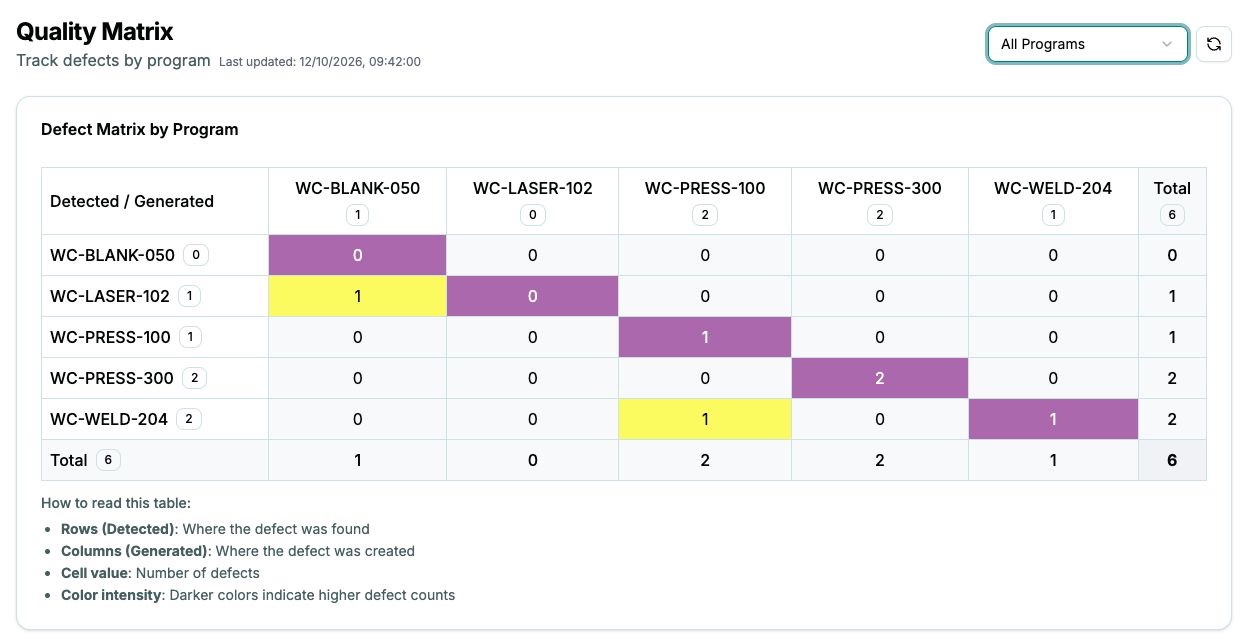
Quality matrix: rows show detection stations, columns show generation stations.
Quality Matrix · Recorded product view. Rows show where defects were found; columns show where they were made.

Bring cost into the decision.

Optional.

When you're ready, add cost inputs from your finance team to turn on the cost view. Weigh competing priorities by estimated cost, alongside the pattern and the quantities affected.

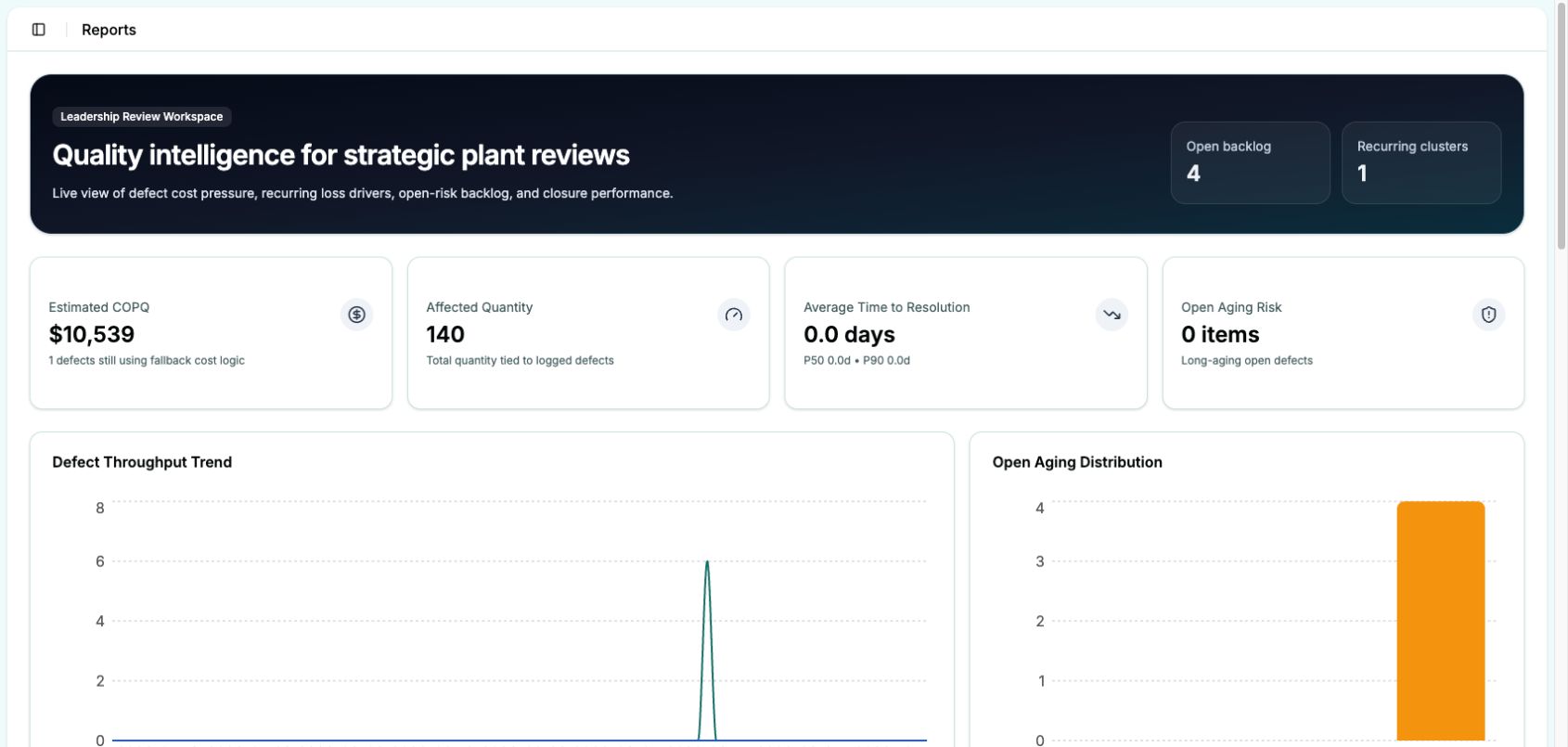
Reports dashboard showing estimated cost of poor quality, affected quantity, resolution time and open aging risk.
Reports · Estimated cost of poor quality and operational measures. Your company supplies the cost inputs; they are optional for getting started.

The review ends on a decision: which problem you'll investigate next, where you'll look, and who needs to be involved.

What it doesn't replace

QualityTrace sits beside your quality management system. Your 8D process, control plans, PPAP and customer reporting stay as they are. It adds one thing they probably don't do: it records where each defect was made as well as where it was found, and shows the pattern. In the working session, we assess which recording steps QualityTrace could replace and where duplicate entry would remain.

Book a working session

90-minute working session · Learn the method and explore the fit for your plant

05 · What it's worth

Easier days on the floor. A lower cost of poor quality.

Installing the capability changes two things: how the work feels for the people doing it, and what poor quality costs your plant.

What gets easier, and for whom

Workplace Who What gets easier
line
Operators and team leaders Log a defect on one screen, from a list they already know. One way in, whatever the source.
inspection bench
Inspectors Add where it was made to the same record. No chasing emails, no retyping.
engineering desk
Quality engineers Get assigned the defects that matter, with the story of what happened already attached.
review room
Quality managers Walk into the review with the matrix already built. Show your plant manager why you're prioritizing what you are.

What we ask of each person, and how long it takes
Who What they do Time
Operators and team leadersLog each defect where it's found, from your plant's listTimeDepends on the record and your process
InspectorsAdd where each defect was madeTimeDepends on the investigation
Quality engineersInvestigate the defects assigned to them and record what they findTimeWork they already do, now in one place
Quality managerRuns the review from the matrix and assigns investigationsTimeYour existing review
ITInstalls and runs it on your systems, from our guideTimeScoped with your IT team

What changes in the numbers

Once every defect has a place where it was made and a place where it was found, three things change.

  1. 01

    See what keeps coming back.

    Every defect is in one place, so the recurring ones stand out by type, station and quantity. Your team stops chasing the easiest defect and starts on the ones that matter most.

  2. 02

    Stop it being made.

    Point engineering time at the station creating the defect. Every defect you prevent is scrap and rework you no longer pay for.

  3. 03

    Catch it sooner.

    See where defects slip through, and move detection closer to the source. Each station earlier means less work lost, and fewer defects reach your customer.

Estimate

What would fewer defects be worth in your plant?

Enter your costs and choose a reduction to explore. This is a scenario, not a forecast of QualityTrace results. Nothing you enter leaves your browser.

{{ oError }}

Defects a year
{{ oDefects }}
What they cost you
{{ oCost }} {{ oYear }}
Scenario annual savings
{{ oSave }} {{ oYear }}
Payback on the package
{{ oPay }}
Total cost of defects{{ oCost }}
{{ cReduction }}% scenario · {{ oSave }}

Payback is at the full US$30,000 price. At the founding price it's {{ oPayFound }}.

Book a working session
How the estimate works
  • Defects a year = annual production × defect rate.
  • What they cost = defects a year × average cost of a defect.
  • Scenario savings = annual defect cost × your assumed relative reduction.
  • Payback = package price ÷ yearly savings.

Your chosen reduction is relative: a 1% reduction turns 10,000 defective units into 9,900, not a one-point drop in the defect rate. We assume the average cost per defective unit stays constant. This illustration is not evidence of an expected result. Benefits depend on the improvements your team makes. Simple payback excludes hosting, implementation time and extra support costs.

06 · Track record

Built on the shop floor. Backed by operational experience.

2 years in daily use

Designed inside a working plant.

QualityTrace was designed, built and implemented hands-on inside an operating automotive supplier plant. Two years of daily use shaped it around the realities of production: the people, routines and pressures involved in managing quality.

It was designed to fit into everyday operations with minimal change to how teams work. The plant continues to use it today.

Future Operations Studio

Built by Future Operations Studio.

QualityTrace comes from the product studio of Future Operations, a boutique operational transformation consultancy with experience working with manufacturers around the world.

The studio turns that hands-on consulting experience into practical tools that help teams put improvements into daily practice.

Book a working session

90-minute working session · Learn the method and explore the fit for your plant

07 · What you getThe offer · QualityTrace

Not just software. Everything it takes to install the capability.

You're not buying a login. You're buying a kit to install the practice: expert sessions to get it right, practical tools to set it up, and software you run on your own systems, with source code included.

  1. 01–02Two sessions with Daniel
  2. 03–06The toolkit
  3. 07–10The software

Two working sessions with Daniel

Portrait of Daniel Simoes, Future Operations.
Your expert · Leads both sessions Daniel Simoes Senior Partner and Managing Director, Future Operations

Hands-on experience putting operational improvement into practice in manufacturing. Daniel brought the Auto Quality Matrix to the plant where QualityTrace was built.

  1. Session 1before go-live
  2. go-live
  3. Session 2once data is flowing
With you, your inspectors and your team leaders

Get the most out of the Auto Quality Matrix and QualityTrace.

Daniel takes your team through the method and how to read the matrix. Then he sets up how it runs in your plant: your defect list, who records where a defect was made and when, and how your quality review runs from the matrix.

You leave with: a plan for your defect list, recording roles and review routine.

Once your data is flowing

Make sense of your own data.

Daniel reviews your matrix with your team: what the patterns show, which records are missing an origin, which defect types need splitting, and where to look first.

You leave with: a shared reading of your matrix and priorities to investigate.

What to fix, and in what order, stays your decision. If you want more help from there, Future Operations can support you further.

We agree session timing and format with your team.

The toolkit

Step-by-step kits to configure the software, set up capture, and onboard operators, inspectors and engineers. Plus a practice guide to running your quality review from the matrix.

The software

QualityTrace, installed on your own systems, with the source code. Your team sets up lines, stations and defect types, and changes them as the plant changes.

What's in the kit

# Part What it does for you
01Session 1 with DanielSet up the method and your routine before go-live
02Session 2 with DanielMake sense of your own data, with your team
03QualityTrace practice guideRun your quality review from the matrix
04Capture and onboarding kitsAgree who records what, and train the people involved
05Configuration toolkitSet up and maintain lines, stations and defect types
06IT suitability check and installation kitIT confirms the fit before you commit, then installs
07Defect capture and investigation workflowEvery defect in one record, from capture to closed
08Auto Quality Matrix and quality dashboardsOrigin, detection, recurring defects and quantities in one view
09Software and source codeRun it on your systems, and commission changes if you need them
10Optional cost viewRank defects in dollars, using your own cost inputs
What it runs on

A web application with a database, on a server your IT team runs, delivered as source code. Your people use it in a browser on a desk PC or tablet on the plant network. It doesn't connect to your ERP, your MES or any machine. We assess hosting requirements with your IT team before you commit.

08 · Investment

One investment. No subscription.

US$30,000

The complete kit: two sessions with Daniel, the toolkit, and the software with its source code. Manual defect entry. No AI or automatic system integrations in this version.

US$10,000

The complete package, plus setup support for your IT team and help with onboarding and product use, in return for a feedback conversation every two weeks about how it's working. Support scope and feedback are agreed before purchase.

Future Operations can support you at any time, with consulting on the method and technology support for the software.

One plant, multiple lines Founding offer
The complete kitOne plant, multiple linesIncludedFounding offerIncluded
Setup supportHelp for your IT team, and questions on onboarding and product useOne plant, multiple linesAvailable for a feeFounding offerFree
Ongoing consulting and technology supportAvailable any timeAvailable for a feeAvailable for a fee
Book a working session

90-minute working session · Learn the method and explore the fit for your plant

You provide the IT environment and your team's time.

We work through your plant’s purchasing requirements in the working session.

How buying and installing works

Decide
  1. 01Working session. 90 minutes with Daniel, to see whether it fits your plant.Daniel Simoes
  2. 02Letter of intent. You confirm you want to go ahead at the agreed price, subject to the IT check.
  3. 03IT check. Your IT team confirms QualityTrace can run on your systems, using our short checklist.
Set up
  1. 04Order and delivery. You receive the toolkit. Your IT team receives the code and the installation kit, and installs it.
  2. 05Session 1 with Daniel. You set up the method, your defect list and your review routine.Daniel Simoes
Run
  1. 06Go live on one line. Onboard your operators and inspectors with the kit, get the routine working, then extend it line by line.
  2. 07Session 2 with Daniel. Once data is flowing, you make sense of it together.Daniel Simoes

Timings depend on your plant and your IT team, and we'll plan them with you.

Why one purchase, not a subscription

Software like this is usually rented per person, per month, for as long as you use it. We offer a one-time purchase. You buy the package once, run it on your own systems and keep the source code. No renewal, no per-seat count. Hosting, your IT time and any extra support or development still cost something, and we'll be clear about those up front.

09 · INTERESTED? WHERE TO START

90 minutes with Daniel: learn the method, and see what it shows in your plant.

A working session on a video call. It's worth your time whether or not you go further. You'll learn the Auto Quality Matrix from someone who has installed it, and see what it could show in your operation.

What you leave with
  • A working understanding of the Auto Quality Matrix that you can use straight away, with or without QualityTrace.
  • A shared view of how your plant records and handles defects today, and where QualityTrace could fit.
  • A clear view of what installing it would take in your plant: the people, the time and the IT.
How the 90 minutes run
  1. 01The method: how the matrix works, and what it reveals
  2. 02How the method has been applied inside a working plant
  3. 03QualityTrace live: one defect, from capture to decision
  4. 04Your plant: how you record and handle defects today, the people involved, and how QualityTrace could fit

No preparation needed. If useful, we can agree a small example in advance. No commitment to buy.

Portrait of Daniel Simoes, Future Operations.

Daniel Simoes · Senior Partner and Managing Director, Future Operations

Hands-on experience putting operational improvement into practice in manufacturing. Daniel brought the Auto Quality Matrix to the plant where QualityTrace was built, ran it with the team for two years, and leads both sessions in the package.

Email Daniel to arrange a session

90 minutes · Video call · Obligation free

Prefer to use your own email service? Copy Daniel’s address:

daniel@future-operations.com {{ copyStatus }} Print / save this page
Email Daniel with your plant, your role and a few suitable times. Include the quality manager and the person who can sponsor the operational decision.
Who should come

Your quality manager and the person who can sponsor the decision: your plant, operations or general manager. Please attend together. A team leader or inspector who knows the line can join too.

10 · Questions

Practical questions.

Getting started

How much effort does setup take?

Your team configures lines, stations and defect types, agrees who records what, trains the people involved and arranges installation with IT. The kits and Daniel's first session guide each step. We'll scope the effort for your plant before you commit.

Can we start on one line?

Yes, and we recommend it. Get the routine working on one line, then extend it to the rest of the plant with the same kit. The price covers the whole plant.

What if we don't know where a defect was made?

Log it anyway, and add the origin once it's been investigated. Completing that field is what makes the matrix useful, and Daniel's second session works through records that are still missing it.

We don't hold a regular quality review. Does that matter?

The matrix pays off when a team looks at it regularly and acts on it. If that routine isn't in place yet, the practice guide and Daniel's first session help you set up one that fits your week.

We already log defects in our ERP, MES or quality system. Is this a second system?

QualityTrace is a separate application with manual defect entry. In the working session, we assess whether it can replace an existing recording step or would create duplicate entry. Automatic integrations aren't included. If your current system already records where defects were made and found, and shows the pattern, you may not need QualityTrace.

Does QualityTrace use AI?

No. This version uses recorded defect data and calculations to build the matrix and optional cost views. AI-assisted root-cause analysis and suggested countermeasures are not included.
The numbers and buying

Does the calculator predict our savings?

No. You choose a hypothetical reduction to explore what it would be worth using your own figures. We have not established a typical savings percentage for QualityTrace.

Do we need finance data to start?

No. Capture, the matrix and the core views work without it. You can add your own cost inputs later to rank defects in dollars.

What happens after the working session?

If it looks like a fit, the next step is a letter of intent at the agreed price, subject to a check by your IT team. We send IT a short suitability checklist before you finalize anything. If it isn't a fit, you keep what you learned.

What does the founding offer involve?

The first three companies receive the complete package for US$10,000, including setup support, in return for a feedback conversation every two weeks. The package covers one plant, with multiple lines. We agree the support scope and feedback arrangements before purchase; additional plants are discussed separately.

IT, data and support

How do I take this to IT?

You don't need to assess it yourself. After a letter of intent, we send your IT team a short suitability check covering hosting, security, access and backups. You'll need an IT owner to confirm the fit and arrange installation. We agree the deployment requirements before purchase.

Can we change it ourselves?

Yes. You can configure lines, stations, defect types, roles and users in the settings. The package also includes the source code. Broader changes require development by your team or a developer you commission, subject to the agreed licence. We confirm the licence terms before purchase.

Who owns the data?

You do. The product runs in your IT environment. We agree any access needed for setup or support with you.

What support and updates are included?

The toolkit and two sessions with Daniel are included. Founding customers also receive setup support for their IT team, onboarding and product use, with the scope agreed before purchase. Additional consulting and technical support are available at a fee. We agree support duration and the terms for bug fixes, security updates and future versions before purchase.